
Currently Empty: ₹0.00
Computers
Block Diagram of Computer: 5 Easy Power Units
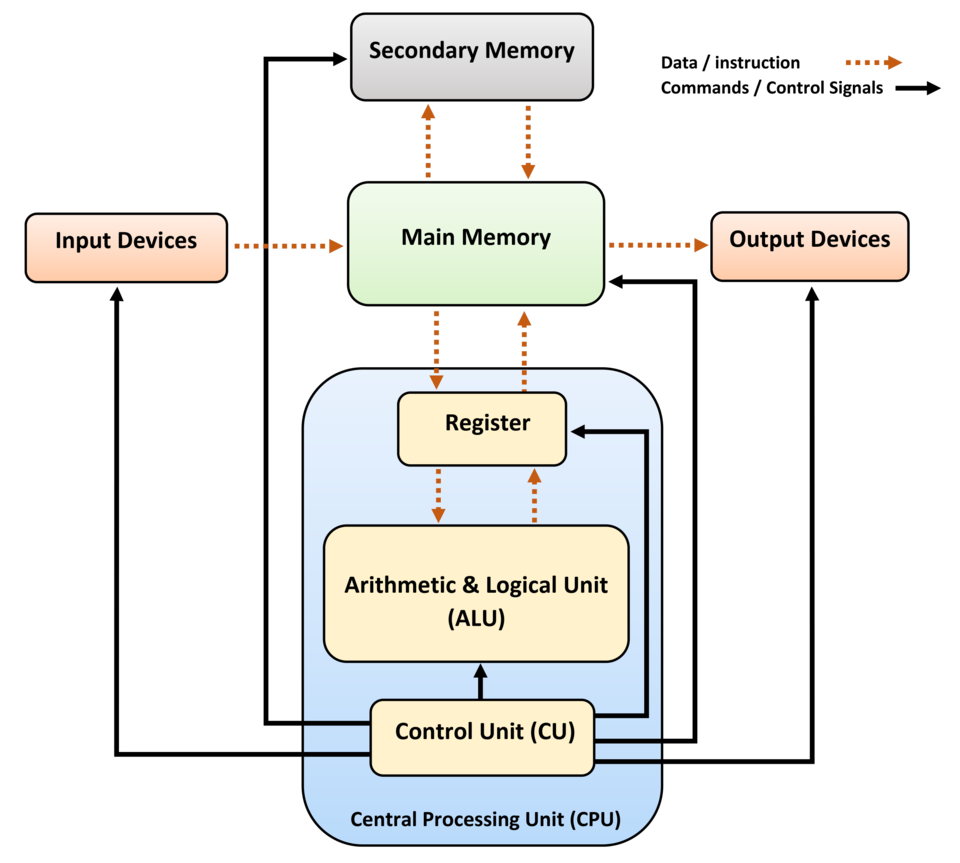
Block Diagram of Computer
A computer looks like a single machine, but inside it has many parts working together. To understand how a computer works, students learn the Block Diagram of Computer. A block diagram is a simple box diagram that shows how input, processing, memory and output units work together. It helps students clearly understand the working of a computer system and makes learning easy for exams.
Introduction
The Block Diagram of Computer is a simple diagram made using boxes. It shows how data enters the computer, how it is processed and how results are produced.
Main Units of a Computer
A computer has four main units:
-
Input Unit
-
Central Processing Unit (CPU)
-
Memory Unit
-
Output Unit
All units work together like a team.
CPU and Its Parts
The CPU is the brain of the computer. It has three parts:
-
Control Unit – controls all operations
-
ALU – performs calculations and logic
-
Registers – small memory for quick work
Input, Output and Memory Units
-
Input Unit – takes data from keyboard, mouse, scanner
-
Output Unit – shows result using monitor, printer, speakers
-
Memory Unit – stores data temporarily and permanently
Primary memory includes RAM and ROM. Secondary memory includes hard disk, SSD and pen drive.
Data Flow in a Computer
-
Data enters through input devices
-
CPU processes the data
-
Memory stores information
-
Output shows the result
Why Block Diagram Is Important
-
Easy to understand computer basics
-
Simple to draw in exams
-
Helps learn advanced topics later
-
Builds strong foundation
Conclusion
The Block Diagram of Computer is the easiest way for students to understand how a computer system works. It clearly explains the role of input, CPU, memory and output units. Learning this concept helps students score better in exams and understand computers confidently.
FAQs
1. What is a block diagram of computer?
A simple diagram showing how a computer works.
2. What are the main units?
Input, CPU, Memory and Output.
3. Why is CPU important?
It processes data and controls the system.